To search
Softonic Rating:
Good:7/10
License:
Evaluation
Added:
February 21, 2008
Publisher:
Website
File size:
7.6 MB
Downloads:
101
Cyril Roger

“Print a file listing from your Mac”

by Cyril Roger

If you're the kind of person that burns a lot of DVDs or CDs, chances are you need to print out a list of the contents of your disks.

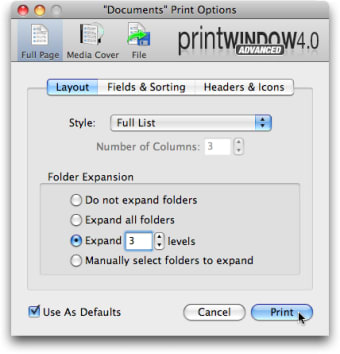
With an application like Print Window, you can do just that in seconds, straight from your Finder. The application lets you effectively print three types of lists: a full page, a media cover (basically a CD cover) and a file (which you can save in your Mac).

While not highly advanced, Print Window will allow you to somewhat edit the list, setting things like headers, fields, icons and style. You can also choose how deep into your folders the list goes, so it also prints out names of sub folders.

Overall, Print Window is a useful little tool to print out a list from your Finder in seconds.

Languages:

English

Limitations:

30 day Trial Period

OS requirements for Print Window:

  • OS: Mac OS X

Minimum requirements:

  • Mac OS X 10.3.9 or later
Pros
  • Expand folder list
  • Set headers, fields and icons
  • Full page, media cover or file
Cons
  • Basic tool
Did you like this review?
5 of 9 users liked it (56%)

From the publisher of Print Window

Print Window offers the ability to print a file listing directly from within the Mac OS X Finder. No more taking screenshots of windows or settling for text-only printouts of filenames only. Print Window provides the works: icons, file information, sorting and so much more!

Print Window options

Print Window Options

Reviews for Print Window in other languages

Softonic Rating:Good
9/10

User Rating

1 rating
Usability
  • Currently 8/10.
Stability
  • Currently 9/10.
Installation
  • Currently 10/10.
Functionality
  • Currently 10/10.
Appearance
  • Currently 10/10.
soccer

Download stats

Related

Related searches